
Tool Calling 與業務資料查詢
店家的營業額與歷史人流來自內部資料。Tool Calling 讓模型依問題產生工具名稱與參數,由後端查詢,再將結果交給模型組織成回覆。店家小幫手的營業額、人流與幣別換算,需要同時處理查詢範圍、參數驗證、多輪執行和資料是否齊全。
工具格式與天氣範例見系列(二)。下方程式使用 Chat Completions、Pydantic 2 與 gpt-6-sol,並設定 reasoning_effort="none";此模型的 Chat Completions 函式工具需要這個設定。Responses 的封裝與 call_id 回填方式見遷移篇。
工具呼叫與結果回填
應用程式提供訊息與允許的工具,模型回傳工具名稱和 JSON 參數,後端驗證、查詢後,以原工具呼叫 ID 回填結果。一個問題可能需要多次查詢;下方程式將單次回應限制為一個工具,持續取得營業額與人流兩項資料後,才要求最終回答。
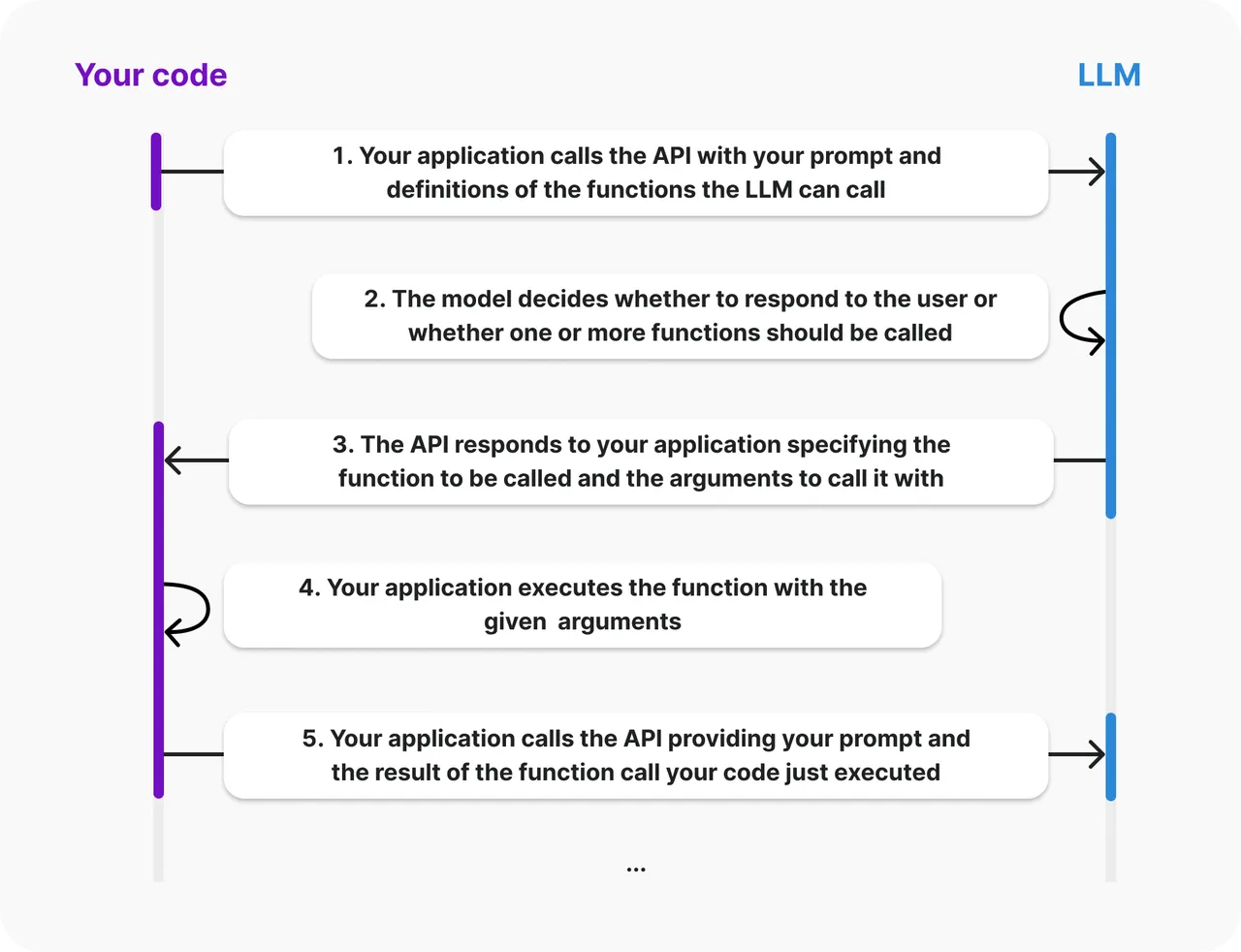
工具呼叫、工具結果與必要報表是三種不同的紀錄。後端根據成功取得的結果確認資料是否齊全,避免模型只查到其中一項資料就產生完整結論。
營業額、人流與換匯查詢範例
資料、參數與店家權限
營收、人流與匯率使用固定示範資料,沒有連接真實帳務。店家識別來自登入後的應用程式環境,不由模型填寫;金額以 Decimal 計算後回傳,模型只負責敘述結果。下方程式共用同一個 client、資料與函式定義,金鑰由環境變數 OPENAI_API_KEY 讀取。
import json
from datetime import date
from decimal import Decimal, ROUND_HALF_UP
from typing import Literal
from openai import OpenAI
from pydantic import BaseModel, ConfigDict, ValidationError

client = OpenAI(timeout=60.0, max_retries=1)
ACTOR = {
    "store_id": "store-a",
    "allowed_reports": {"get_daily_revenue", "get_historical_pedestrian_flow"},
}

class StrictArgs(BaseModel):
    model_config = ConfigDict(extra="forbid")

class DailyRevenue(StrictArgs):
    report_date: date

class HistoricalPedestrianFlow(StrictArgs):
    day_of_the_week: Literal["SUN", "MON", "TUE", "WED", "THU", "FRI", "SAT"]

REVENUE = {("store-a", date(2026, 6, 1)): Decimal("15000000")}
PEDESTRIAN_FLOW = {("store-a", "THU"): 300}
TWD_PER_USD = Decimal("31.5")

def get_daily_revenue(args: DailyRevenue) -> dict:
    amount = REVENUE.get((ACTOR["store_id"], args.report_date))
    if amount is None:
        return {"ok": False, "error": {"code": "not_found"}}
    usd = (amount / TWD_PER_USD).quantize(Decimal("0.01"), rounding=ROUND_HALF_UP)
    return {
        "ok": True,
        "store_id": ACTOR["store_id"],
        "date": args.report_date.isoformat(),
        "currency": "TWD",
        "revenue": str(amount),
        "twd_per_usd": str(TWD_PER_USD),
        "revenue_usd": str(usd),
        "source": "demo_revenue_table",
    }

def get_historical_pedestrian_flow(args: HistoricalPedestrianFlow) -> dict:
    count = PEDESTRIAN_FLOW.get((ACTOR["store_id"], args.day_of_the_week))
    if count is None:
        return {"ok": False, "error": {"code": "not_found"}}
    return {
        "ok": True,
        "store_id": ACTOR["store_id"],
        "day_of_the_week": args.day_of_the_week,
        "historical_pedestrian_flow": count,
        "source": "demo_pedestrian_flow_table",
    }

REGISTRY = {
    "get_daily_revenue": (DailyRevenue, get_daily_revenue, "查詢指定日期的店家營業額與換算金額。"),
    "get_historical_pedestrian_flow": (
        HistoricalPedestrianFlow,
        get_historical_pedestrian_flow,
        "查詢指定星期的歷史人流,不代表未來人流預測。",
    ),
}
查無資料以 not_found 表示,與營業額零元、人流零人有不同意義,會直接影響模型的結論。正式資料庫查詢仍須包含伺服器決定的店家範圍;跨店分析則由後端確認使用者可查的店家集合,提供符合權限的工具。
工具定義與派送表
REGISTRY 同時提供參數模型、執行函式與用途說明,讓工具定義和後端 dispatch 使用同一份白名單。strict=True 約束參數結構,Pydantic 再驗證 JSON 與日期;查詢權限及資料是否存在仍由後端判斷。
TOOL_DEFINITIONS = {
    name: {
        "type": "function",
        "function": {
            "name": name,
            "description": description,
            "parameters": args_type.model_json_schema(),
            "strict": True,
        },
    }
    for name, (args_type, _handler, description) in REGISTRY.items()
}

def execute_tool(name: str, raw_arguments: str) -> dict:
    if name not in REGISTRY:
        return {"ok": False, "error": {"code": "unknown_tool"}}
    if name not in ACTOR["allowed_reports"]:
        return {"ok": False, "error": {"code": "forbidden"}}
    args_type, handler, _description = REGISTRY[name]
    try:
        arguments = args_type.model_validate_json(raw_arguments)
    except ValidationError:
        return {"ok": False, "error": {"code": "invalid_arguments"}}
    return handler(arguments)
多輪工具執行器
查詢問題同時需要營業額與人流,呼叫端因此傳入兩項必要報表。尚未取得結果的工具才會提供給模型,required 要求查詢,全部取得後改為 none,只整理已有結果。parallel_tool_calls=False 限制單次回應的工具數量,不限制後續回合的查詢。
def answer_store_question(question: str, required_reports: set[str]) -> str:
    if not required_reports or not required_reports <= REGISTRY.keys():
        raise ValueError("本例需要至少一項已定義的報表。")
    if not required_reports <= ACTOR["allowed_reports"]:
        raise PermissionError("本次要求的報表不在使用者可查詢的範圍。")
    messages = [
        {
            "role": "developer",
            "content": (
                "你是店家資料助理,以繁體中文回答。先查齊本次需要的資料;"
                "只採用ok=true的工具結果,不編造查無資料的數字。"
                "金額與換算金額依工具值顯示,歷史人流不得寫成明日預測。"
            ),
        },
        {"role": "user", "content": question},
    ]
    obtained = set()
    for _round in range(6):
        missing = required_reports - obtained
        tools = [TOOL_DEFINITIONS[name] for name in sorted(missing or required_reports)]
        response = client.chat.completions.create(
            model="gpt-6-sol",
            reasoning_effort="none",
            store=False,
            max_completion_tokens=2048,
            messages=messages,
            tools=tools,
            tool_choice="required" if missing else "none",
            parallel_tool_calls=False,
        )
        choice = response.choices[0]
        message = choice.message
        if message.refusal:
            raise RuntimeError(f"模型拒絕本次請求:{message.refusal}")
        if choice.finish_reason in {"length", "content_filter"}:
            raise RuntimeError(f"回應未完成:{choice.finish_reason}")
        calls = message.tool_calls or []
        if not calls:
            if choice.finish_reason != "stop" or missing or not message.content:
                raise RuntimeError("所需資料或最終回應尚未完成。")
            return message.content
        if choice.finish_reason != "tool_calls":
            raise RuntimeError("工具回應的完成狀態不正確。")
        if any(call.type != "function" for call in calls):
            raise RuntimeError("本例只接受已定義的函式工具。")
        if any(not call.id for call in calls) or len({call.id for call in calls}) != len(calls):
            raise RuntimeError("回應出現缺少或重複的工具呼叫 ID。")
        messages.append({
            "role": "assistant",
            "tool_calls": [
                {
                    "id": call.id,
                    "type": "function",
                    "function": {
                        "name": call.function.name,
                        "arguments": call.function.arguments,
                    },
                }
                for call in calls
            ],
            **({"content": message.content} if message.content is not None else {}),
        })
        for call in calls:
            name = call.function.name
            if name not in missing:
                result = {"ok": False, "error": {"code": "unexpected_report"}}
            else:
                result = execute_tool(name, call.function.arguments)
                if result.get("ok") is True:
                    obtained.add(name)
            messages.append({
                "role": "tool",
                "tool_call_id": call.id,
                "content": json.dumps(result, ensure_ascii=False),
            })
    raise RuntimeError("工具流程超過本例設定的六輪上限。")

answer = answer_store_question(
    "查詢2026-06-01的營業額,以台幣與美元列出;另外說明星期四的歷史人流。",
    {"get_daily_revenue", "get_historical_pedestrian_flow"},
)
print(answer)
tool_call_id 與結果配對
assistant 的工具呼叫加入歷史後,每個呼叫都附上 role="tool" 與相同的 tool_call_id。參數驗證失敗也有對應的工具錯誤;若直接跳過呼叫,下一輪就會缺少結果。非預期的資料庫或服務例外交回應用程式,保留工具與請求紀錄,由呼叫端決定是否重新查詢。
成功條件由 required_reports 與 obtained 判斷,而非採信模型宣稱已完成。自由問答的必要報表可來自明確的使用者操作,或經驗證的意圖資料;每個問題只查詢需要的工具。
換匯結果與歷史資料
示範資料的台幣營業額是 15,000,000,以 31.5 台幣兌一美元計算,四捨五入至小數點兩位為 476,190.48 美元;星期四的歷史人流為 300 人。這些值由工具提供,最終回答只需附上日期、幣別、來源與歷史資料的性質。需要精確表格或帳務畫面時,也可以直接呈現工具結果,不再請模型重新寫一次。
執行狀態與錯誤處理
finish_reason 與 refusal
tool_calls 表示模型提出工具呼叫,stop 通常表示一般回應完成;length 與 content_filter 則屬於未完成狀態。截斷的 arguments 不進入 JSON 解析或工具執行。finish_reason、message.refusal 與實際工具清單共同決定後續處理,請求層的 4xx/5xx、工具層的查無資料與模型拒絕也分別保留狀態。
JSON Schema 與後端驗證
工具參數與結構化回覆都能使用 JSON Schema,但用途不同:工具參數要經過執行與結果回填,回覆格式則限制最終要交給使用者或程式的資料。兩者的深入型別設計見系列(四)。無論哪種方式,日期範圍、店家權限、匯率來源與跨欄位關係都必須再由後端驗證。
平行呼叫與冪等
範例關閉平行呼叫,兩項資料依序取得。使用 parallel_tool_calls=True 時,同一回應中的每個呼叫都需要結果,全部收齊後一起回填;併發查詢數、整體等待時間、交易與工具權限仍由應用程式管理。
查詢工具通常可以重新取得資料;有寫入效果的工具則需保存業務操作識別與結果。tool_call_id 對應本次模型流程,重送可能產生新的呼叫 ID,因此訂單建立、付款或通知不能只用它判斷是否已執行。取消、回填與恢復流程見Responses 工具除錯篇。
tool_choice 設定
| 設定 | 適合的控制方式 |
|---|---|
auto | 模型可直接回答,也可呼叫工具;一般自由問答可先採用。 |
required | 要求本輪呼叫工具;適合像主例一樣必須查資料才能回答的流程。 |
none | 本輪不再提出工具呼叫;可用於已查齊資料後的整理。 |
{"type":"function","function":{"name":"get_daily_revenue"}} | 指定 Chat Completions 函式工具;只在產品確實需要固定工具時使用。 |
工具與上下文用量
工具的名稱、說明、Schema 與回填資料都會參與後續上下文,可透過 response.usage 記錄用量。完整報表保存在系統內,交給模型的工具與資料只需包含本次回答所需範圍,無須每輪附上整套工具庫。
拒絕、權限與查無資料
模型拒絕執行請求、使用者沒有查詢權限,以及資料庫沒有指定日期紀錄,是三種不同情況。前者由 message.refusal 處理,後兩者由工具結果與產品狀態表示。畫面與紀錄應能分辨它們,不用相同的空白回答取代。
工具數量與選擇範圍
Chat Completions 的函式工具定義上限為 128 個;官方建議以較小的集合設計及評估,少於 20 個是實務起點,並非超過該數量就必然失準。範例每輪只提供仍缺少的報表工具;較大的工具庫可依功能或權限建立候選集合。
業務資料與模型回覆
模型負責選擇工具與組織回覆,後端負責工具白名單、使用者範圍、參數、查詢結果與資料完整性。這些狀態與業務函式獨立於 API 封裝,資料缺漏、服務失敗或流程中斷時有各自的處理方式,更換端點或模型也能保留原有業務邏輯。
工具契約與模型搭配可查閱Function calling、Chat Completions reference與GPT-6 Sol。